ToDo App - React FastApi 연동
0. DB
CREATE DATABASE IF NOT EXISTS todoapp;
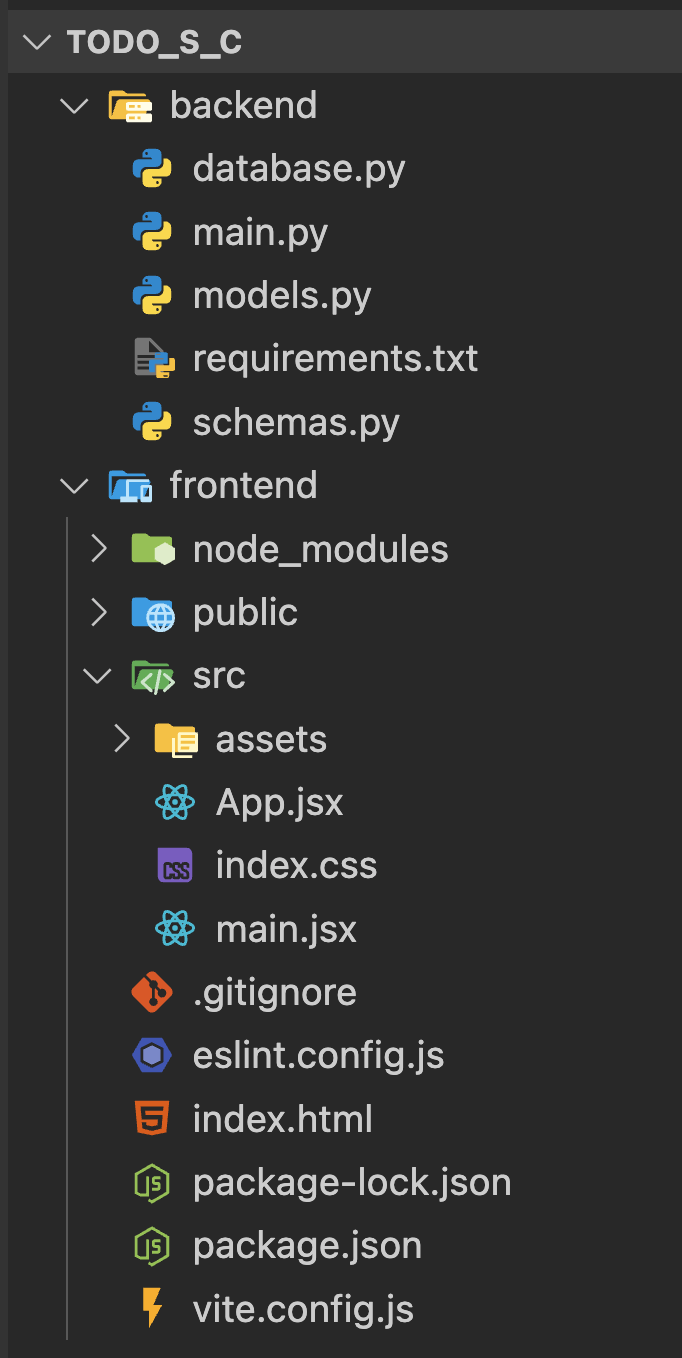
1. BackEnd
콘다 가상환경 생성하고 라이브러리 설치
conda create -n todoapp
conda activate todoapp
conda install pip
cd backend/
/backend/requirements.txt 생성
fastapi
uvicorn
sqlalchemy
pymysql
cryptography
pydantic
python-multipart
fastapi-cors
라이브러리 설치
pip install -r requirements.txt
/backend/database.py
from sqlalchemy import create_engine
from sqlalchemy.ext.declarative import declarative_base
from sqlalchemy.orm import sessionmaker

# MySQL 데이터베이스 URL
# 형식: mysql+pymysql://username:password@host:port/database_name
DATABASE_URL = "mysql+pymysql://root:1234@localhost:3306/todoapp"

# SQLAlchemy 엔진 생성
engine = create_engine(
    DATABASE_URL,
    echo=True,  # SQL 쿼리 로그 출력 (개발 시에만 True)
    pool_pre_ping=True,  # 연결 확인
    pool_recycle=300,  # 연결 재활용 시간
)

# 세션 로컬 클래스 생성
SessionLocal = sessionmaker(autocommit=False, autoflush=False, bind=engine)

# Base 클래스 생성
Base = declarative_base()

# 데이터베이스 세션 의존성
def get_db():
    db = SessionLocal()
    try:
        yield db
    finally:
        db.close()
/backend/models.py
from sqlalchemy import Column, Integer, String, Boolean, DateTime
from sqlalchemy.sql import func
from database import Base

class Todo(Base):
    __tablename__ = "todos"

    id = Column(Integer, primary_key=True, index=True, autoincrement=True)
    title = Column(String(200), nullable=False, index=True)
    description = Column(String(500), nullable=True)
    completed = Column(Boolean, default=False, nullable=False)
    created_at = Column(DateTime(timezone=True), server_default=func.now())
    updated_at = Column(DateTime(timezone=True), onupdate=func.now())

    def __repr__(self):
        return f"<Todo(id={self.id}, title='{self.title}', completed={self.completed})>"
/backend/schemas.py
from pydantic import BaseModel, Field
from datetime import datetime
from typing import Optional

# Todo 생성 시 사용할 스키마
class TodoCreate(BaseModel):
    title: str = Field(..., min_length=1, max_length=200, description="할 일 제목")
    description: Optional[str] = Field(None, max_length=500, description="할 일 설명")

# Todo 업데이트 시 사용할 스키마
class TodoUpdate(BaseModel):
    title: Optional[str] = Field(None, min_length=1, max_length=200)
    description: Optional[str] = Field(None, max_length=500)
    completed: Optional[bool] = None

# Todo 응답 시 사용할 스키마
class TodoResponse(BaseModel):
    id: int
    title: str
    description: Optional[str] = None
    completed: bool
    created_at: datetime
    updated_at: Optional[datetime] = None

    class Config:
        from_attributes = True  # SQLAlchemy 모델을 Pydantic 모델로 변환

# 여러 Todo를 응답할 때 사용할 스키마
class TodoListResponse(BaseModel):
    todos: list[TodoResponse]
    total: int
/backend/main.py
from fastapi import FastAPI, Depends, HTTPException, status
from fastapi.middleware.cors import CORSMiddleware
from sqlalchemy.orm import Session
from typing import List

import models
import schemas
from database import engine, get_db

# 데이터베이스 테이블 생성
models.Base.metadata.create_all(bind=engine)

# FastAPI 인스턴스 생성
app = FastAPI(
    title="Todo API",
    description="FastAPI로 만든 Todo 관리 API",
    version="1.0.0"
)

# CORS 설정
app.add_middleware(
    CORSMiddleware,
    allow_origins=["http://localhost:3000", "http://127.0.0.1:3000", "http://localhost:5173"],  # React 개발 서버 주소
    allow_credentials=True,
    allow_methods=["*"],  # 모든 HTTP 메서드 허용
    allow_headers=["*"],  # 모든 헤더 허용
)

# 루트 엔드포인트
@app.get("/")
async def root():
    return {"message": "Todo API 서버가 실행 중입니다!"}

# 모든 Todo 조회
@app.get("/todos", response_model=List[schemas.TodoResponse])
def get_todos(
    skip: int = 0,
    limit: int = 100,
    db: Session = Depends(get_db)
):
    """모든 Todo 항목을 조회합니다."""
    todos = db.query(models.Todo).offset(skip).limit(limit).all()
    return todos

# 특정 Todo 조회
@app.get("/todos/{todo_id}", response_model=schemas.TodoResponse)
def get_todo(todo_id: int, db: Session = Depends(get_db)):
    """특정 ID의 Todo 항목을 조회합니다."""
    todo = db.query(models.Todo).filter(models.Todo.id == todo_id).first()
    if not todo:
        raise HTTPException(
            status_code=status.HTTP_404_NOT_FOUND,
            detail=f"ID {todo_id}인 Todo를 찾을 수 없습니다."
        )
    return todo

# 새로운 Todo 생성
@app.post("/todos", response_model=schemas.TodoResponse, status_code=status.HTTP_201_CREATED)
def create_todo(todo: schemas.TodoCreate, db: Session = Depends(get_db)):
    """새로운 Todo 항목을 생성합니다."""
    db_todo = models.Todo(**todo.dict())
    db.add(db_todo)
    db.commit()
    db.refresh(db_todo)
    return db_todo

# Todo 수정
@app.put("/todos/{todo_id}", response_model=schemas.TodoResponse)
def update_todo(
    todo_id: int,
    todo_update: schemas.TodoUpdate,
    db: Session = Depends(get_db)
):
    """특정 ID의 Todo 항목을 수정합니다."""
    todo = db.query(models.Todo).filter(models.Todo.id == todo_id).first()
    if not todo:
        raise HTTPException(
            status_code=status.HTTP_404_NOT_FOUND,
            detail=f"ID {todo_id}인 Todo를 찾을 수 없습니다."
        )

    # 수정할 데이터만 업데이트
    update_data = todo_update.dict(exclude_unset=True)
    for key, value in update_data.items():
        setattr(todo, key, value)

    db.commit()
    db.refresh(todo)
    return todo

# Todo 삭제
@app.delete("/todos/{todo_id}")
def delete_todo(todo_id: int, db: Session = Depends(get_db)):
    """특정 ID의 Todo 항목을 삭제합니다."""
    todo = db.query(models.Todo).filter(models.Todo.id == todo_id).first()
    if not todo:
        raise HTTPException(
            status_code=status.HTTP_404_NOT_FOUND,
            detail=f"ID {todo_id}인 Todo를 찾을 수 없습니다."
        )

    db.delete(todo)
    db.commit()
    return {"message": f"ID {todo_id}인 Todo가 성공적으로 삭제되었습니다."}

# 완료 상태 토글
@app.patch("/todos/{todo_id}/toggle", response_model=schemas.TodoResponse)
def toggle_todo_completion(todo_id: int, db: Session = Depends(get_db)):
    """Todo의 완료 상태를 토글합니다."""
    todo = db.query(models.Todo).filter(models.Todo.id == todo_id).first()
    if not todo:
        raise HTTPException(
            status_code=status.HTTP_404_NOT_FOUND,
            detail=f"ID {todo_id}인 Todo를 찾을 수 없습니다."
        )

    todo.completed = not todo.completed
    db.commit()
    db.refresh(todo)
    return todo

if __name__ == "__main__":
    import uvicorn
    uvicorn.run(app, host="0.0.0.0", port=8000, reload=True)
uvicorn main:app --reload
2. FrontEnd
1. node.js 설치
설치 후 버전 확인
node -v
npm -v
2. 프로젝트 생성
vite+react+tailwindcss 프로젝트 생성
vite로 리액트 프로젝트 생성, 워킹디렉토리로 이동, 라이브러리 설치
npm create vite@latest
# 프로젝트명 frontend, react, javascript
cd frontend
npm i
npm install tailwindcss @tailwindcss/vite
npm install axios
vite.config.js 파일 설정
import { defineConfig } from 'vite'
import react from '@vitejs/plugin-react'
import tailwindcss from '@tailwindcss/vite'

// https://vite.dev/config/
export default defineConfig({
  plugins: [react(), tailwindcss()],
})
src/index.css에 기존 내용 제거 후 추가
@import "tailwindcss";
src/main.jsx
import { useState, useEffect } from 'react'
import axios from 'axios'

const API_URL = 'http://localhost:8000'

export default function App() {
  const [todos, setTodos] = useState([])
  const [newTodo, setNewTodo] = useState('')
  const [newDescription, setNewDescription] = useState('')
  const [loading, setLoading] = useState(false)
  const [error, setError] = useState('')

  // 모달 상태
  const [isModalOpen, setIsModalOpen] = useState(false)
  const [selectedTodo, setSelectedTodo] = useState(null)

  // Todo 목록 조회
  const fetchTodos = async () => {
    try {
      setLoading(true)
      const response = await axios.get(`${API_URL}/todos`)
      setTodos(response.data)
    } catch (err) {
      setError('할 일을 불러오는데 실패했습니다.')
      console.error(err)
    } finally {
      setLoading(false)
    }
  }

  // Todo 추가
  const addTodo = async (e) => {
    e.preventDefault()
    if (!newTodo.trim()) return

    try {
      const response = await axios.post(`${API_URL}/todos`, {
        title: newTodo.trim(),
        description: newDescription.trim() || undefined
      })
      setTodos([...todos, response.data])
      setNewTodo('')
      setNewDescription('')
      setError('')
    } catch (err) {
      setError('할 일 추가에 실패했습니다.')
      console.error(err)
    }
  }

  // 커스텀 모달 열기
  const openDeleteModal = (todo) => {
    setSelectedTodo(todo)
    setIsModalOpen(true)
  }

  // 모달에서 삭제 확정
  const confirmDelete = async () => {
    if (!selectedTodo) return
    try {
      await axios.delete(`${API_URL}/todos/${selectedTodo.id}`)
      setTodos(todos.filter(todo => todo.id !== selectedTodo.id))
      setSelectedTodo(null)
      setIsModalOpen(false)
    } catch (err) {
      setError('할 일 삭제에 실패했습니다.')
      console.error(err)
    }
  }

  // Todo 완료 상태 토글
  const toggleTodo = async (id) => {
    try {
      const response = await axios.patch(`${API_URL}/todos/${id}/toggle`)
      setTodos(todos.map(todo => todo.id === id ? response.data : todo))
    } catch (err) {
      setError('상태 변경에 실패했습니다.')
      console.error(err)
    }
  }

  useEffect(() => {
    fetchTodos()
  },[])

  return (
    <>
      <div className="min-h-screen bg-gray-50 py-8 flex flex-col items-center justify-center">
        <div className="w-full max-w-2xl px-4 py-8 bg-white rounded-lg shadow-md">
          {/* 헤더 */}
          <header className="text-center mb-8">
            <h1 className="text-4xl font-bold text-gray-900 mb-2">📝 Todo App</h1>
          </header>

          {/* 에러 메시지 */}
          {error && (
            <div className="bg-red-100 border border-red-400 text-red-700 px-4 py-3 rounded mb-6">
              <div className="flex justify-between items-center">
                <span>{error}</span>
                <button
                  onClick={() => setError('')}
                  className="text-red-500 hover:text-red-700 font-bold"
                >
                  ×
                </button>
              </div>
            </div>
          )}

          {/* Todo 추가 폼 */}
          <div className="bg-white rounded-lg shadow-md p-6 mb-8">
            <form onSubmit={addTodo}>
              <div className="mb-4">
                <input
                  type="text"
                  placeholder="할 일을 입력하세요..."
                  value={newTodo}
                  onChange={(e) => setNewTodo(e.target.value)}
                  className="w-full px-4 py-3 border border-gray-300 rounded-lg focus:outline-none focus:ring-2 focus:ring-blue-500 focus:border-transparent"
                />
              </div>
              <div className="mb-4">
                <textarea
                  placeholder="설명 (선택사항)"
                  value={newDescription}
                  onChange={(e) => setNewDescription(e.target.value)}
                  rows={2}
                  className="w-full px-4 py-3 border border-gray-300 rounded-lg focus:outline-none focus:ring-2 focus:ring-blue-500 focus:border-transparent resize-none"
                />
              </div>
              <button
                type="submit"
                disabled={!newTodo.trim()}
                className="w-full bg-blue-500 hover:bg-blue-600 disabled:bg-gray-300 disabled:cursor-not-allowed text-white font-semibold py-3 px-4 rounded-lg transition duration-200"
              >
                ➕ 할 일 추가
              </button>
            </form>
          </div>

          {/* 로딩 */}
          {loading && (
            <div className="text-center py-8">
              <div className="inline-block animate-spin rounded-full h-8 w-8 border-b-2 border-blue-500"></div>
              <p className="mt-2 text-gray-600">로딩 중...</p>
            </div>
          )}

          {/* Todo 목록 */}
          <div className="bg-white rounded-lg shadow-md">
            <div className="px-6 py-4 border-b border-gray-200">
              <h2 className="text-xl font-semibold text-gray-900">
                할 일 목록 ({todos.length}개)
              </h2>
            </div>

            {todos.length === 0 ? (
              <div className="px-6 py-12 text-center">
                <div className="text-6xl mb-4">📝</div>
                <p className="text-gray-500 text-lg">할 일이 없습니다</p>
                <p className="text-gray-400 mt-1">새로운 할 일을 추가해보세요!</p>
              </div>
            ) : (
              <div className="divide-y divide-gray-200">
                {todos.map((todo) => (
                  <div key={todo.id} className="px-6 py-4 hover:bg-gray-50 transition duration-150">
                    <div className="flex items-start space-x-3">
                      {/* 체크박스 */}
                      <input
                        type="checkbox"
                        checked={todo.completed}
                        onChange={() => toggleTodo(todo.id)}
                        className="mt-1 h-5 w-5 text-blue-600 rounded focus:ring-blue-500"
                      />

                      {/* Todo 내용 */}
                      <div className="flex-1 min-w-0">
                        <h3 className={`text-lg font-medium ${
                          todo.completed
                            ? 'line-through text-gray-500'
                            : 'text-gray-900'
                        }`}>
                          {todo.title}
                        </h3>

                        {todo.description && (
                          <p className={`mt-1 text-sm ${
                            todo.completed ? 'text-gray-400' : 'text-gray-600'
                          }`}>
                            {todo.description}
                          </p>
                        )}

                        <div className="mt-2 flex items-center space-x-4 text-sm text-gray-500">
                          <span>
                            생성일: {new Date(todo.created_at).toLocaleDateString('ko-KR')}
                          </span>
                          {todo.completed && (
                            <span className="bg-green-100 text-green-800 px-2 py-1 rounded-full text-xs font-medium">
                              완료
                            </span>
                          )}
                        </div>
                      </div>

                      {/* 커스텀 모달 열기 버튼 */}
                      <button
                        onClick={() => openDeleteModal(todo)}
                        className="text-red-500 hover:text-red-700 hover:bg-red-50 p-2 rounded-lg transition duration-200"
                        title="삭제"
                      >
                        <svg className="w-5 h-5" fill="none" stroke="currentColor" viewBox="0 0 24 24">
                          <path strokeLinecap="round" strokeLinejoin="round" strokeWidth="2" d="M19 7l-.867 12.142A2 2 0 0116.138 21H7.862a2 2 0 01-1.995-1.858L5 7m5 4v6m4-6v6m1-10V4a1 1 0 00-1-1h-4a1 1 0 00-1 1v3M4 7h16"></path>
                        </svg>
                      </button>
                    </div>
                  </div>
                ))}
              </div>
            )}
          </div>

          {/* 커스텀 모달 */}
          {isModalOpen && (
            <div className="fixed inset-0 flex items-center justify-center bg-black/40 z-50">
              <div className="bg-white rounded-lg shadow-lg p-6 w-full max-w-md">
                <h2 className="text-xl font-semibold text-gray-900 mb-4">
                  정말 삭제하시겠습니까?
                </h2>
                <p className="text-gray-600 mb-6">
                  "{selectedTodo?.title}" 할 일이 삭제됩니다. 이 작업은 되돌릴 수 없습니다.
                </p>
                <div className="flex justify-end space-x-3">
                  <button
                    onClick={() => setIsModalOpen(false)}
                    className="px-4 py-2 rounded-lg bg-gray-200 hover:bg-gray-300 transition"
                  >
                    취소
                  </button>
                  <button
                    onClick={confirmDelete}
                    className="px-4 py-2 rounded-lg bg-red-500 text-white hover:bg-red-600 transition"
                  >
                    삭제
                  </button>
                </div>
              </div>
            </div>
          )}

          {/* 푸터 */}
          <footer className="mt-12 text-center text-gray-500 text-sm">
            <p>React 19 + JavaScript + Tailwind CSS + Vite 7</p>
          </footer>
        </div>
      </div>
    </>
  )
}
빌드 프로세스 시작
npm run dev