Blog 애플리케이션 개발하기
API 명세서

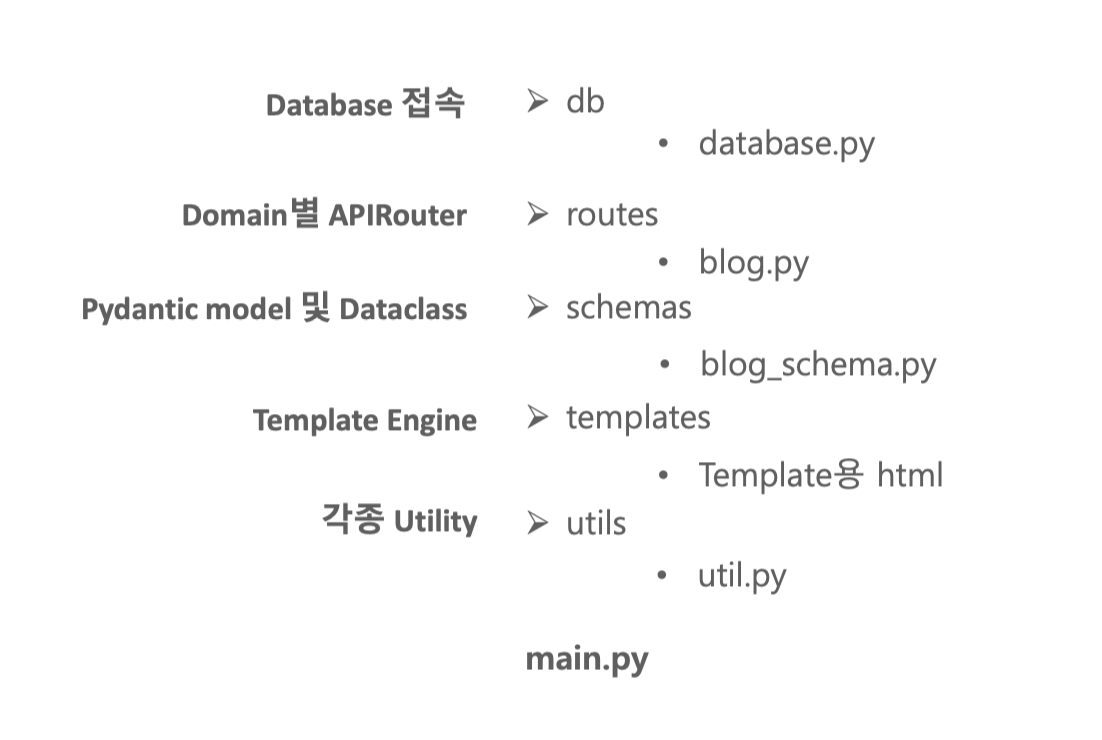
Application 모듈 디렉토리 구조
완성된 블로그 화면 블로그 홈페이지 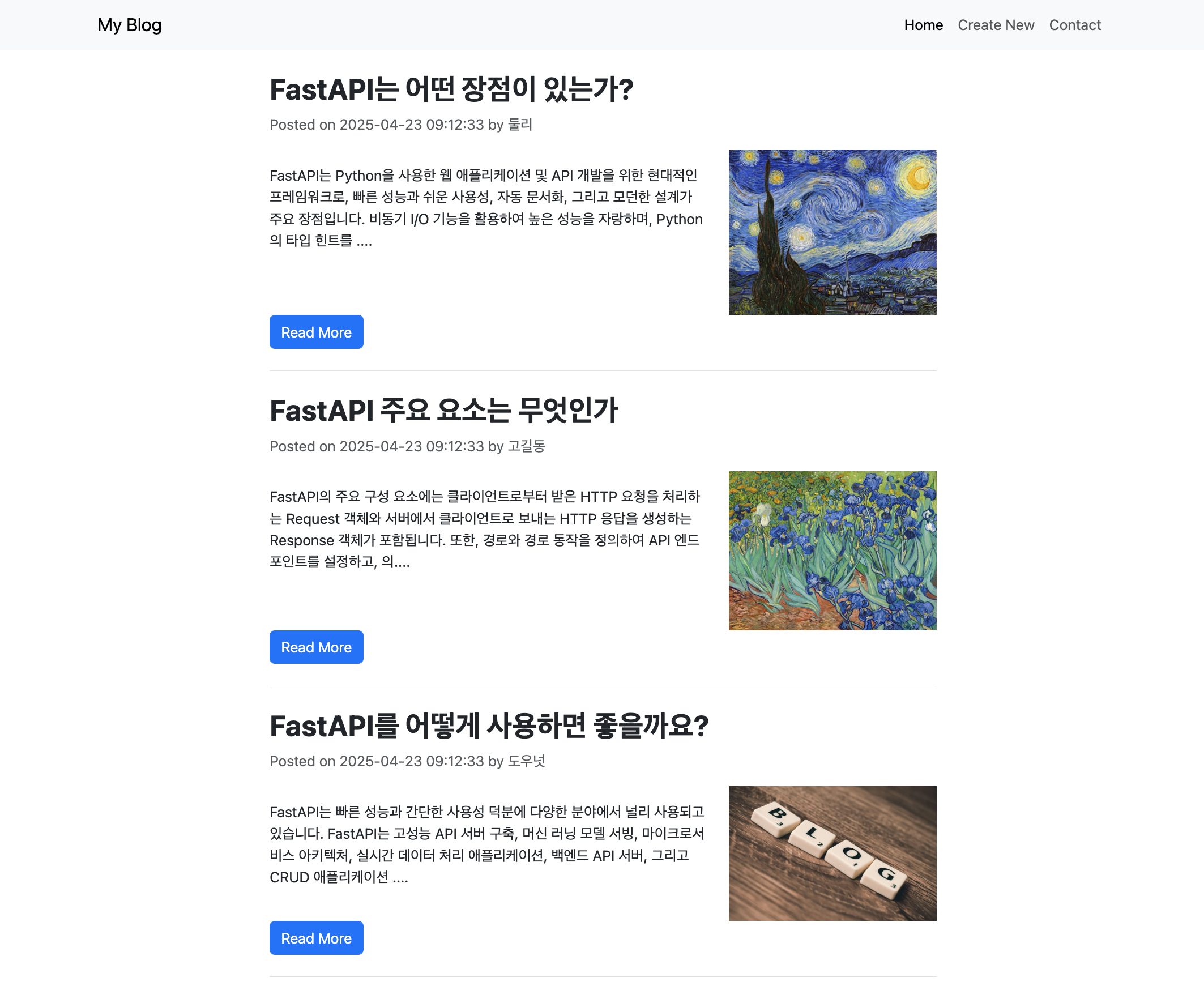
블로그 content 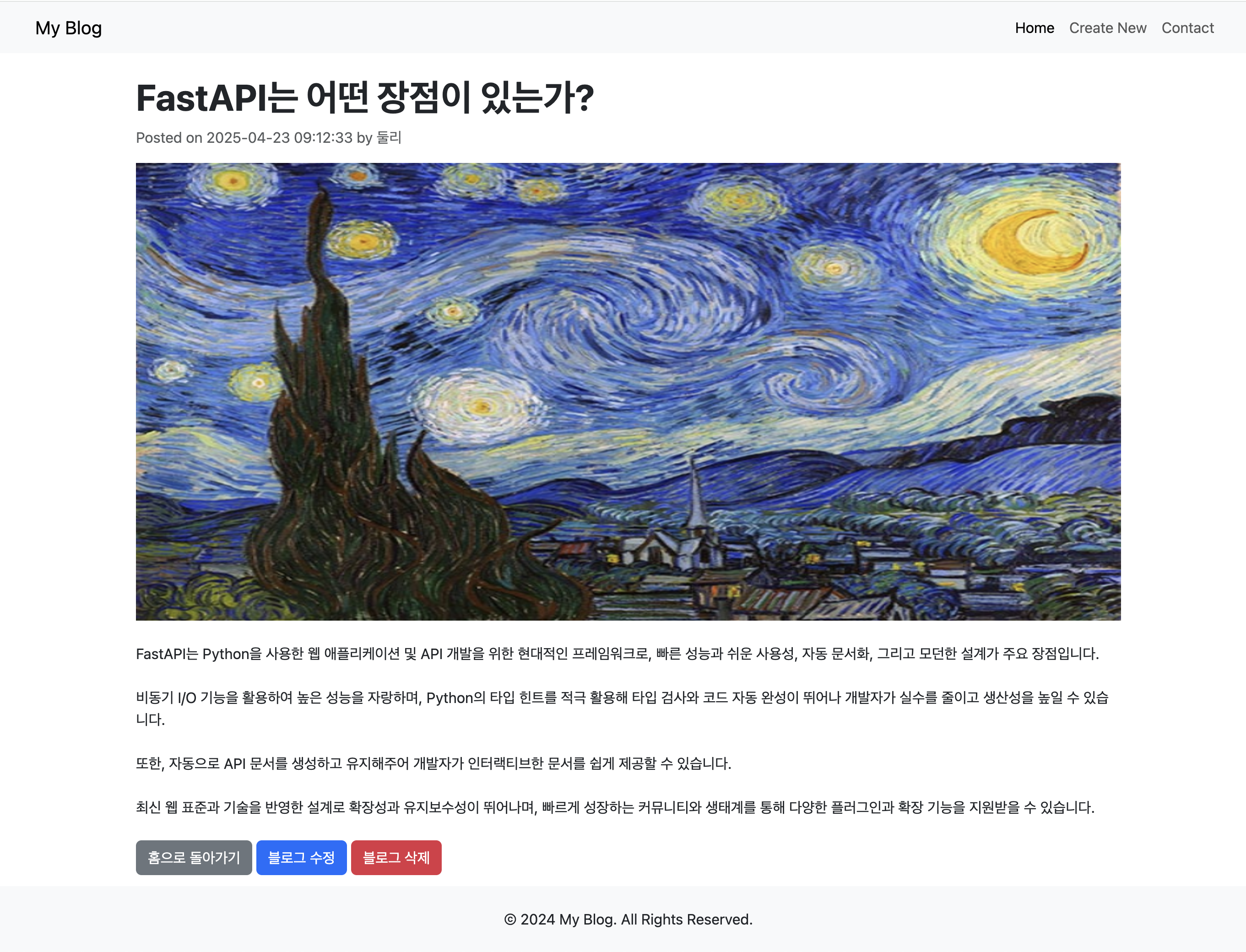
블로그 수정 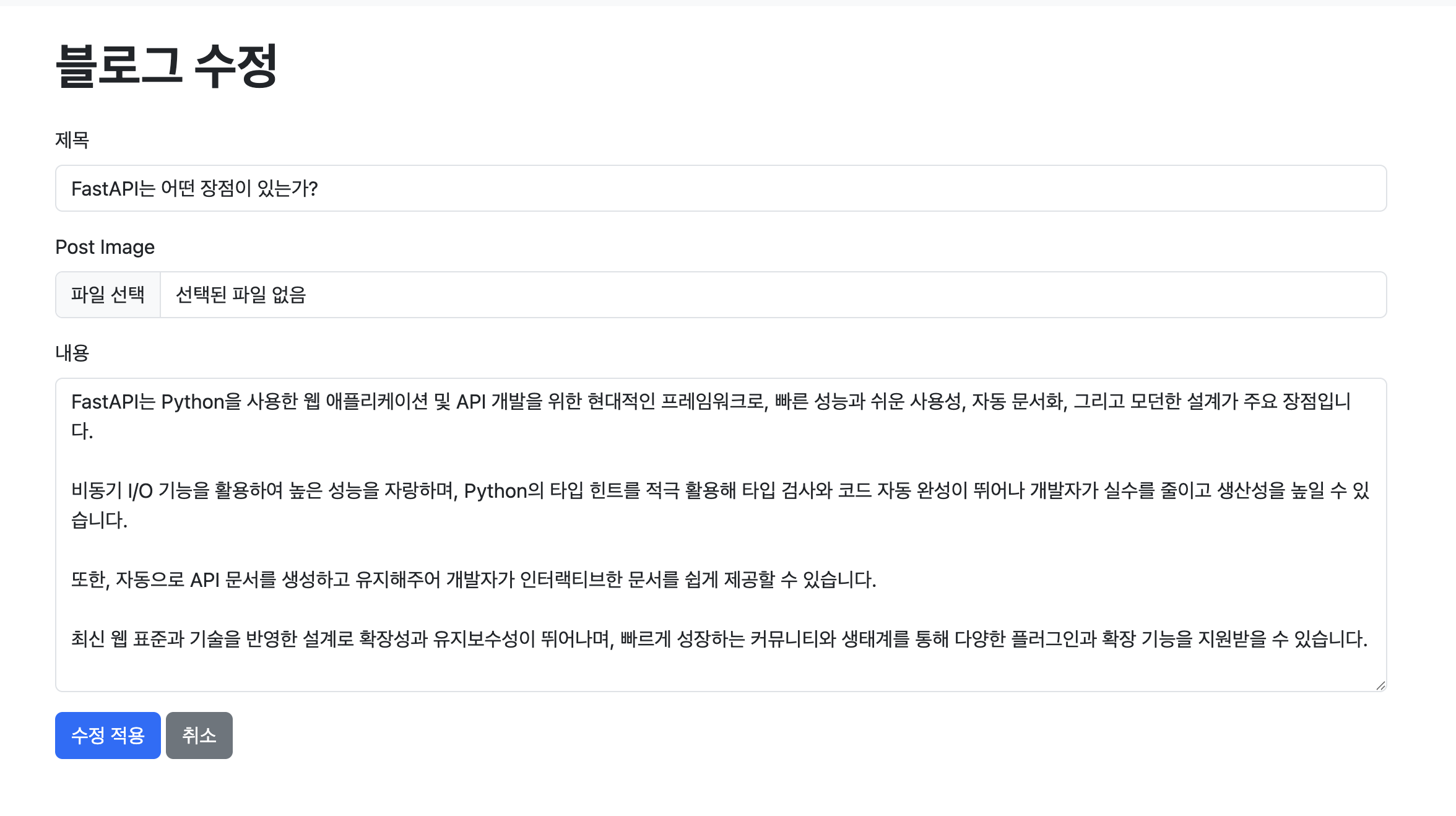
블로그 삭제 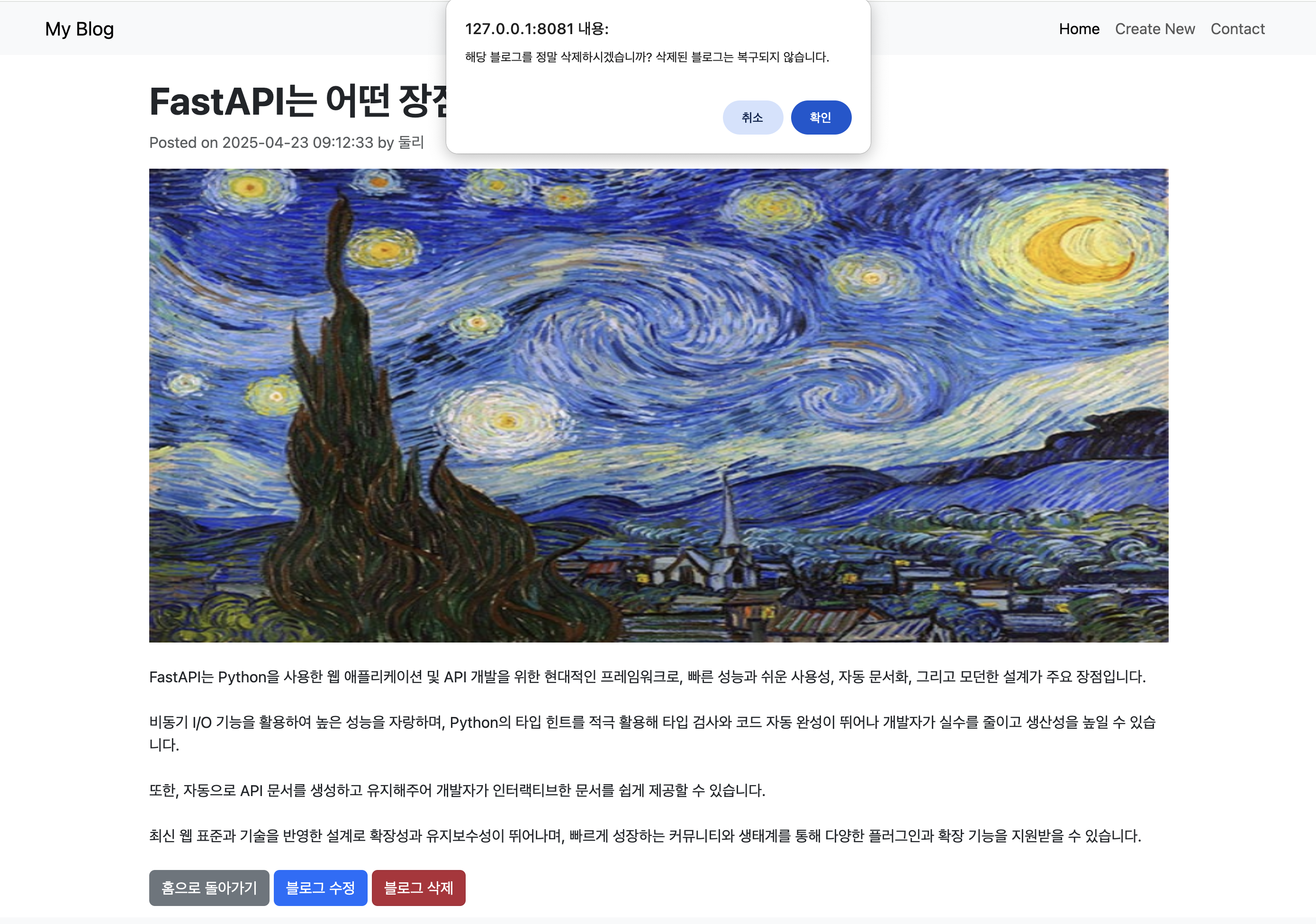
데이터베이스 생성하기
drop database if exists blog_db;
create database blog_db;

use blog_db;

create table blog_db.blog
(id integer auto_increment primary key,
title varchar(200) not null,
author varchar(100) not null,
content varchar(4000) not null,
image_loc varchar(300) null,
modified_dt datetime not null
);

truncate table blog;

insert into blog(title, author, content, modified_dt)
values ('FastAPI는 어떤 장점이 있는가?', '둘리',
'FastAPI는 Python을 사용한 웹 애플리케이션 및 API 개발을 위한 현대적인 프레임워크로, 빠른 성능과 쉬운 사용성, 자동 문서화, 그리고 모던한 설계가 주요 장점입니다. \n
비동기 I/O 기능을 활용하여 높은 성능을 자랑하며, Python의 타입 힌트를 적극 활용해 타입 검사와 코드 자동 완성이 뛰어나 개발자가 실수를 줄이고 생산성을 높일 수 있습니다. \n
또한, 자동으로 API 문서를 생성하고 유지해주어 개발자가 인터랙티브한 문서를 쉽게 제공할 수 있습니다. \n
최신 웹 표준과 기술을 반영한 설계로 확장성과 유지보수성이 뛰어나며, 빠르게 성장하는 커뮤니티와 생태계를 통해 다양한 플러그인과 확장 기능을 지원받을 수 있습니다.'
, now());

insert into blog(title, author, content, modified_dt)
values ('FastAPI 주요 요소는 무엇인가', '고길동',
'FastAPI의 주요 구성 요소에는 클라이언트로부터 받은 HTTP 요청을 처리하는 Request 객체와 서버에서 클라이언트로 보내는 HTTP 응답을 생성하는 Response 객체가 포함됩니다.\n
 또한, 경로와 경로 동작을 정의하여 API 엔드포인트를 설정하고, 의존성 주입을 통해 코드의 모듈화와 재사용성을 높일 수 있습니다.\n
 요청 바디는 Pydantic 모델을 사용해 자동으로 유효성 검사되며, 경로 및 쿼리 매개변수로 API 요청에서 전달되는 데이터를 처리합니다. \n
 FastAPI는 OpenAPI와 JSON Schema를 기반으로 API 문서를 자동 생성하며, Swagger UI와 ReDoc을 통해 실시간으로 API를 탐색하고 테스트할 수 있는 기능을 제공합니다.\n
 템플릿 렌더링 기능을 통해 HTML 페이지를 동적으로 생성할 수 있어, API뿐만 아니라 전체 웹 애플리케이션도 쉽게 구축할 수 있습니다.'
, now());

insert into blog(title, author, content, modified_dt)
values ('FastAPI를 어떻게 사용하면 좋을까요?', '도우넛',
'FastAPI는 빠른 성능과 간단한 사용성 덕분에 다양한 분야에서 널리 사용되고 있습니다.\n
FastAPI는 고성능 API 서버 구축, 머신 러닝 모델 서빙, 마이크로서비스 아키텍처, 실시간 데이터 처리 애플리케이션, 백엔드 API 서버, 그리고 CRUD 애플리케이션 개발 등 다양한 분야에서 사용됩니다.\n
특히, 비동기 처리를 통한 빠른 성능과 자동 문서화 기능 덕분에 실시간 데이터 처리나 챗봇, IoT 애플리케이션 같은 응답 속도가 중요한 프로젝트에 적합합니다.\n
또한, 웹 애플리케이션의 백엔드 API 서버로 사용되거나, Pydantic과 SQLAlchemy 같은 라이브러리와 결합해 CRUD 애플리케이션을 빠르고 효율적으로 개발할 수 있습니다.\n
FastAPI는 다양한 규모와 유형의 프로젝트에서 성능과 개발 효율성을 높이는 데 큰 역할을 합니다.'
, now());

COMMIT;

/* connection 모니터링 스크립트. root로 수행 필요. */
select * from sys.session where db='blog_db' order by conn_id;
환경 설정 파일 작성하기
Blog_DB_Handling/.env
DATABASE_CONN = "mysql+mysqlconnector://root:root1234@localhost:3306/blog_db"
DRIVERNAME="mysql+mysqlconnector"
USERNAME="root"
PASSWORD="root1234"
HOST="localhost"
PORT="3306"
DATABASE="blog_db"
데이터베이스와 연결함수 작성
Blog_DB_Handling/db/database.py
from sqlalchemy import create_engine, Connection, URL
from sqlalchemy.exc import SQLAlchemyError
from sqlalchemy.pool import QueuePool, NullPool
from contextlib import contextmanager
from fastapi import status
from fastapi.exceptions import HTTPException
from dotenv import load_dotenv
import os

# database connection URL
# DATABASE_CONN = "mysql+mysqlconnector://root:root1234@localhost:3306/blog_db"
load_dotenv()

# DATABASE_CONN = os.getenv("DATABASE_CONN")

DATABASE_CONN = URL.create(
    drivername=os.getenv('DRIVERNAME'),
    username=os.getenv('USERNAME'),
    password=os.getenv('PASSWORD'),
    host=os.getenv('HOST'),
    database=os.getenv('DATABASE'),
    port=os.getenv('PORT')
)

engine = create_engine(DATABASE_CONN,
                    echo=True,
                    poolclass=QueuePool,
                    #poolclass=NullPool, # Connection Pool 사용하지 않음.
                    pool_size=10,
                    max_overflow=0,
                    pool_recycle=300)

def direct_get_conn():
    conn = None
    try:
        conn = engine.connect()
        return conn
    except SQLAlchemyError as e:
        print(e)
        raise HTTPException(status_code=status.HTTP_503_SERVICE_UNAVAILABLE,
                            detail="요청하신 서비스가 잠시 내부적으로 문제가 발생하였습니다.")

def context_get_conn():
    conn = None
    try:
        conn = engine.connect()
        yield conn
    except SQLAlchemyError as e:
        print(e)
        raise HTTPException(status_code=status.HTTP_503_SERVICE_UNAVAILABLE,
                            detail="요청하신 서비스가 잠시 내부적으로 문제가 발생하였습니다.")
    finally:
        if conn:
            conn.close()
글자의 길이를 150으로 잘라주는 함수와 웹브라우저에서 줄바꿈을 위한 태그로 변환함수
Blog_DB_Handling/utils/util.py
def truncate_text(text, limit=150) -> str:
    if text is not None:
        if len(text) > limit:
            truncated_text = text[:limit] + "...."
        else:
            truncated_text = text
        return truncated_text
    return None

def newline_to_br(text_newline: str) -> str:
    if text_newline is not None:
        return text_newline.replace('\n', '<br>')
    return None
schema 작성
Blog_DB_Handling/schemas/blog_schema.py
from pydantic import BaseModel, Field
from datetime import datetime
from typing import Optional, Annotated
from pydantic.dataclasses import dataclass

# 클라이언트 입력 검증(사용자로부터 받는 데이터만 정의,보안상 id 등 제외)
class BlogInput(BaseModel):
    title: str = Field(..., min_length=2, max_length=200)
    author: str = Field(..., max_length=100)
    content: str = Field(..., min_length=2, max_length=4000)
    image_loc: Optional[str] = Field(None, max_length=400)
    #image_loc: Annotated[str, Field(None, max_length=400)] = None

# 응답용 전체 구조(입력 + 시스템 필드 포함)
class Blog(BlogInput):
    id: int
    modified_dt: datetime

# 내부 데이터 처리(경량객체,명시적 데이터 구조)
@dataclass
class BlogData:
    id: int
    title: str
    author: str
    content: str
    modified_dt: datetime
    image_loc: str | None = None
FastAPI 프로그램 진입점
Blog_DB_Handling/main.py
from fastapi import FastAPI
from routes import blog

app = FastAPI()
app.include_router(blog.router)
api 명세서에 따른 router
Blog_DB_Handling/routes/blog.py
from fastapi import APIRouter, Request, Depends, Form, status
from fastapi.responses import RedirectResponse
from fastapi.exceptions import HTTPException
from fastapi.templating import Jinja2Templates
from db.database import direct_get_conn, context_get_conn
from sqlalchemy import text, Connection
from sqlalchemy.exc import SQLAlchemyError
from schemas.blog_schema import Blog, BlogData
from utils import util


# router 생성
router = APIRouter(prefix="/blogs", tags=["blogs"])

# jinja2 Template 엔진 생성
templates = Jinja2Templates(directory="templates")

@router.get("/")
async def get_all_blogs(request: Request):
    conn = None
    try:
        conn = direct_get_conn()
        query = """
        SELECT id, title, author, content, image_loc, modified_dt FROM blog;
        """
        result = conn.execute(text(query))
        all_blogs = [BlogData(id=row.id,
                              title=row.title,
                              author=row.author,
                              content=util.truncate_text(row.content),
                              image_loc=row.image_loc,
                              modified_dt=row.modified_dt) for row in result]

        result.close()
        return templates.TemplateResponse(
            request = request,
            name = "index.html",
            context = {"all_blogs": all_blogs}
        )

    except SQLAlchemyError as e:
        print(e)
        raise HTTPException(status_code=status.HTTP_503_SERVICE_UNAVAILABLE,
                            detail="요청하신 서비스가 잠시 내부적으로 문제가 발생하였습니다.")
    except Exception as e:
        print(e)
        raise HTTPException(status_code=status.HTTP_500_INTERNAL_SERVER_ERROR,
                            detail="알수없는 이유로 서비스 오류가 발생하였습니다")
    finally:
        if conn:
            conn.close()

@router.get("/show/{id}")
def get_blog_by_id(request: Request, id: int,
                conn: Connection = Depends(context_get_conn)):
    try:
        query = f"""
        SELECT id, title, author, content, image_loc, modified_dt from blog
        where id = :id
        """
        stmt = text(query)
        bind_stmt = stmt.bindparams(id=id)
        result = conn.execute(bind_stmt)
        # 만약에 한건도 찾지 못하면 오류를 던진다.
        if result.rowcount == 0:
            raise HTTPException(status_code=status.HTTP_404_NOT_FOUND,
                                detail=f"해당 id {id}는(은) 존재하지 않습니다.")

        row = result.fetchone()

        blog = BlogData(id=row[0],
                        title=row[1],
                        author=row[2],
                        content=util.newline_to_br(row[3]),
                        image_loc=row[4],
                        modified_dt=row[5])

        result.close()
        return templates.TemplateResponse(
            request = request,
            name="show_blog.html",
            context = {"blog": blog})

    except SQLAlchemyError as e:
        print(e)
        raise HTTPException(status_code=status.HTTP_503_SERVICE_UNAVAILABLE,
                            detail="요청하신 서비스가 잠시 내부적으로 문제가 발생하였습니다.")
    except Exception as e:
        print(e)
        raise HTTPException(status_code=status.HTTP_500_INTERNAL_SERVER_ERROR,
                            detail="알수없는 이유로 서비스 오류가 발생하였습니다")


@router.get("/new")
def create_blog_ui(request: Request):
    return templates.TemplateResponse(
        request = request,
        name = "new_blog.html",
        context = {}
    )

@router.post("/new")
def create_blog(request: Request
                , title = Form(min_length=2, max_length=200)
                , author = Form(max_length=100)
                , content = Form(min_length=2, max_length=4000)
                , conn: Connection = Depends(context_get_conn)):
    try:
        query = f"""
        INSERT INTO blog(title, author, content, modified_dt)
        values ('{title}', '{author}', '{content}', now())
        """
        conn.execute(text(query))
        conn.commit()

        return RedirectResponse("/blogs", status_code=status.HTTP_302_FOUND)
    except SQLAlchemyError as e:
        print(e)
        conn.rollback()
        raise HTTPException(status_code=status.HTTP_400_BAD_REQUEST,
                            detail="요청데이터가 제대로 전달되지 않았습니다.")

@router.get("/modify/{id}")
def update_blog_ui(request: Request, id: int, conn = Depends(context_get_conn)):
    try:
        query = f"""
        select id, title, author, content from blog where id = :id
        """
        stmt = text(query)
        bind_stmt = stmt.bindparams(id=id)
        result = conn.execute(bind_stmt)
        # 해당 id로 데이터가 존재하지 않으면 오류를 던진다.
        if result.rowcount == 0:
            raise HTTPException(status_code=status.HTTP_404_NOT_FOUND,
                                detail=f"해당 id {id}는(은) 존재하지 않습니다.")
        row = result.fetchone()

        return templates.TemplateResponse(
            request = request,
            name="modify_blog.html",
            context = {"id": row.id, "title": row.title,
                    "author": row.author, "content": row.content}
        )
    except SQLAlchemyError as e:
        print(e)
        raise HTTPException(status_code=status.HTTP_400_BAD_REQUEST,
                            detail="요청데이터가 제대로 전달되지 않았습니다.")

@router.post("/modify/{id}")
def update_blog(request: Request, id: int
                , title = Form(min_length=2, max_length=200)
                , author = Form(max_length=100)
                , content = Form(min_length=2, max_length=4000)
                , conn: Connection = Depends(context_get_conn)):

    try:
        query = f"""
        UPDATE blog
        SET title = :title , author= :author, content= :content
        where id = :id
        """
        bind_stmt = text(query).bindparams(id=id, title=title,
                                        author=author, content=content)
        result = conn.execute(bind_stmt)
        # 해당 id로 데이터가 존재하지 않아 update 건수가 없으면 오류를 던진다.
        if result.rowcount == 0:
            raise HTTPException(status_code=status.HTTP_404_NOT_FOUND,
                                detail=f"해당 id {id}는(은) 존재하지 않습니다.")
        conn.commit()
        return RedirectResponse(f"/blogs/show/{id}", status_code=status.HTTP_302_FOUND)
    except SQLAlchemyError as e:
        print(e)
        conn.rollback()
        raise HTTPException(status_code=status.HTTP_400_BAD_REQUEST,
                            detail="요청데이터가 제대로 전달되지 않았습니다. ")

@router.post("/delete/{id}")
def delete_blog(request: Request, id: int
                , conn: Connection = Depends(context_get_conn)):
    try:
        query = f"""
        DELETE FROM blog
        where id = :id
        """

        bind_stmt = text(query).bindparams(id=id)
        result = conn.execute(bind_stmt)
        # 해당 id로 데이터가 존재하지 않아 delete 건수가 없으면 오류를 던진다.
        if result.rowcount == 0:
            raise HTTPException(status_code=status.HTTP_404_NOT_FOUND,
                                detail=f"해당 id {id}는(은) 존재하지 않습니다.")
        conn.commit()
        return RedirectResponse("/blogs", status_code=status.HTTP_302_FOUND)

    except SQLAlchemyError as e:
        print(e)
        conn.rollback()
        raise HTTPException(status_code=status.HTTP_503_SERVICE_UNAVAILABLE,
                            detail="요청하신 서비스가 잠시 내부적으로 문제가 발생하였습니다.")
Blog_DB_Handling/templates/index.html
<!DOCTYPE html>
<html>
<head>
    <title>블로그에 오신걸 환영합니다</title>
</head>
<body>
    <h1>모든 블로그 리스트</h1>
    <div><a href="/blogs/new">새로운 Blog 생성</a></div>
    {% for blog in all_blogs %}
        <div>
            <h3><a href="/blogs/show/{{ blog.id }}">{{ blog.title }}</a></h3>
            <p><small>Posted on {{ blog.modified_dt }} by {{ blog.author }} </small> </p>
            <p> {{ blog.content }} </p>
        </div>
    {% endfor %}
</body>
</html>
Blog_DB_Handling/templates/show_blog.html
<!DOCTYPE html>
<html>
<head>
    <title>블로그에 오신걸 환영합니다</title>
</head>
<body>
    <div>

        <h1>{{ blog.title }} </h1>
        <h5>Posted on {{ blog.modified_dt }} by {{ blog.author }} </small> </p>
        <h3>{{ blog.content | safe }}</h3>
    </div>
    <div>
        <a href="/blogs">Home으로 돌아가기</a>
        <a href="/blogs/modify/{{ blog.id }}">수정하기</a>
        <form action="/blogs/delete/{{ blog.id }}" method="POST">
            <button>삭제하기</button>
        </form>

    </div>
</body>
</html>
Blog_DB_Handling/templates/new_blog.html
<html>
<head>
    <title>새로운 블로그 생성</title>
</head>
<body>
    <form action="/blogs/new" method="POST">
        <div style="margin-bottom: 20px">
            <label for="title">제목:</label>
            <input type="text" id="title" name="title" style="width: 20rem;">
        </div>
        <div style="margin-bottom: 20px">
            <label for="author">작성자:</label>
            <input type="text" id="author" name="author" style="width: 10rem;">
        </div>
        <div style="margin-bottom: 20px">
            <label for="content">내용:</label>
            <textarea name="content" rows="5" cols="50"></textarea>
        </div>
        <button>신규 블로그 생성</button>
    </form>

</body>
</html>
Blog_DB_Handling/templates/modify_blog.html
<html>
<head>
    <title>블로그 수정</title>
</head>
<body>
    <form action="/blogs/modify/{{ id }}" method="POST">
        <div style="margin-bottom: 20px">
            <label for="title">제목:</label>
            <input type="text" id="title" name="title" value="{{ title }}" style="width: 20rem;">
        </div>
        <div style="margin-bottom: 20px">
            <label for="author">작성자:</label>
            <input type="text" id="author" name="author" value="{{ author }}"style="width: 10rem;">
        </div>
        <div style="margin-bottom: 20px">
            <label for="content">내용:</label>
            <textarea name="content" rows="5" cols="50">{{ content }}</textarea>
        </div>
        <button>블로그 수정</button>
    </form>

</body>
</html>
Blog 애플리케이션 개발하기 - 리팩토링
Blog_MVC/services/blog_svc.py
from fastapi import status
from fastapi.exceptions import HTTPException
from sqlalchemy import text, Connection
from sqlalchemy.exc import SQLAlchemyError
from schemas.blog_schema import Blog, BlogData
from utils import util
from typing import List

def get_all_blogs(conn: Connection) -> List:
    try:
        query = """
        SELECT id, title, author, content, image_loc, modified_dt FROM blog;
        """
        result = conn.execute(text(query))
        all_blogs = [BlogData(id=row.id,
            title=row.title,
            author=row.author,
            content=util.truncate_text(row.content),
            image_loc=row.image_loc,
            modified_dt=row.modified_dt) for row in result]

        result.close()
        return all_blogs
    except SQLAlchemyError as e:
        print(e)
        raise HTTPException(status_code=status.HTTP_503_SERVICE_UNAVAILABLE,
                            detail="요청하신 서비스가 잠시 내부적으로 문제가 발생하였습니다.")
    except Exception as e:
        print(e)
        raise HTTPException(status_code=status.HTTP_500_INTERNAL_SERVER_ERROR,
                            detail="알수없는 이유로 서비스 오류가 발생하였습니다")


def get_blog_by_id(conn: Connection, id: int):
    try:
        query = f"""
        SELECT id, title, author, content, image_loc, modified_dt from blog
        where id = :id
        """
        stmt = text(query)
        bind_stmt = stmt.bindparams(id=id)
        result = conn.execute(bind_stmt)
        # 만약에 한건도 찾지 못하면 오류를 던진다.
        if result.rowcount == 0:
            raise HTTPException(status_code=status.HTTP_404_NOT_FOUND,
                                detail=f"해당 id {id}는(은) 존재하지 않습니다.")

        row = result.fetchone()
        blog = BlogData(id=row[0], title=row[1], author=row[2],
                        content=row[3],
                        image_loc=row[4], modified_dt=row[5])

        result.close()
        return blog

    except SQLAlchemyError as e:
        print(e)
        raise HTTPException(status_code=status.HTTP_503_SERVICE_UNAVAILABLE,
                            detail="요청하신 서비스가 잠시 내부적으로 문제가 발생하였습니다.")
    except Exception as e:
        print(e)
        raise HTTPException(status_code=status.HTTP_500_INTERNAL_SERVER_ERROR,
                            detail="알수없는 이유로 서비스 오류가 발생하였습니다")

def create_blog(conn: Connection, title:str, author: str, content:str):
    try:
        query = f"""
        INSERT INTO blog(title, author, content, modified_dt)
        values ('{title}', '{author}', '{content}', now())
        """
        conn.execute(text(query))
        conn.commit()

    except SQLAlchemyError as e:
        print(e)
        conn.rollback()
        raise HTTPException(status_code=status.HTTP_400_BAD_REQUEST,
                            detail="요청데이터가 제대로 전달되지 않았습니다.")

def update_blog(conn: Connection,  id: int
                ,  title:str
                , author: str
                , content:str):

    try:
        query = f"""
        UPDATE blog
        SET title = :title , author= :author, content= :content
        where id = :id
        """
        bind_stmt = text(query).bindparams(id=id, title=title,
                                        author=author, content=content)
        result = conn.execute(bind_stmt)
        # 해당 id로 데이터가 존재하지 않아 update 건수가 없으면 오류를 던진다.
        if result.rowcount == 0:
            raise HTTPException(status_code=status.HTTP_404_NOT_FOUND,
                                detail=f"해당 id {id}는(은) 존재하지 않습니다.")
        conn.commit()

    except SQLAlchemyError as e:
        print(e)
        conn.rollback()
        raise HTTPException(status_code=status.HTTP_400_BAD_REQUEST,
                            detail="요청데이터가 제대로 전달되지 않았습니다. ")


def delete_blog(conn: Connection, id: int):
    try:
        query = f"""
        DELETE FROM blog
        where id = :id
        """

        bind_stmt = text(query).bindparams(id=id)
        result = conn.execute(bind_stmt)
        # 해당 id로 데이터가 존재하지 않아 delete 건수가 없으면 오류를 던진다.
        if result.rowcount == 0:
            raise HTTPException(status_code=status.HTTP_404_NOT_FOUND,
                                detail=f"해당 id {id}는(은) 존재하지 않습니다.")
        conn.commit()

    except SQLAlchemyError as e:
        print(e)
        conn.rollback()
        raise HTTPException(status_code=status.HTTP_503_SERVICE_UNAVAILABLE,
                            detail="요청하신 서비스가 잠시 내부적으로 문제가 발생하였습니다.")
Blog_MVC/routes/blog.py
from fastapi import APIRouter, Request, Depends, Form, status
from fastapi.responses import RedirectResponse
from fastapi.exceptions import HTTPException
from fastapi.templating import Jinja2Templates
from db.database import direct_get_conn, context_get_conn
from sqlalchemy import text, Connection
from sqlalchemy.exc import SQLAlchemyError
from schemas.blog_schema import Blog, BlogData
from services import blog_svc
from utils import util


# router 생성
router = APIRouter(prefix="/blogs", tags=["blogs"])
# jinja2 Template 엔진 생성
templates = Jinja2Templates(directory="templates")
@router.get("/")
async def get_all_blogs(request: Request, conn: Connection = Depends(context_get_conn)):
    all_blogs = blog_svc.get_all_blogs(conn)

    return templates.TemplateResponse(
        request = request,
        name = "index.html",
        context = {"all_blogs": all_blogs}
    )


@router.get("/show/{id}")
def get_blog_by_id(request: Request, id: int,
                conn: Connection = Depends(context_get_conn)):
    blog = blog_svc.get_blog_by_id(conn, id)
    blog.content = util.newline_to_br(blog.content)

    return templates.TemplateResponse(
        request = request,
        name="show_blog.html",
        context = {"blog": blog})

@router.get("/new")
def create_blog_ui(request: Request):
    return templates.TemplateResponse(
        request = request,
        name = "new_blog.html",
        context = {}
    )

@router.post("/new")
def create_blog(request: Request
                , title = Form(min_length=2, max_length=200)
                , author = Form(max_length=100)
                , content = Form(min_length=2, max_length=4000)
                , conn: Connection = Depends(context_get_conn)):

    blog_svc.create_blog(conn, title=title, author=author, content=content)

    return RedirectResponse("/blogs", status_code=status.HTTP_302_FOUND)


@router.get("/modify/{id}")
def update_blog_ui(request: Request, id: int, conn = Depends(context_get_conn)):
    blog = blog_svc.get_blog_by_id(conn, id=id)

    return templates.TemplateResponse(
        request = request,
        name="modify_blog.html",
        context = {"blog": blog}
    )

@router.post("/modify/{id}")
def update_blog(request: Request, id: int
                , title = Form(min_length=2, max_length=200)
                , author = Form(max_length=100)
                , content = Form(min_length=2, max_length=4000)
                , conn: Connection = Depends(context_get_conn)):

    blog_svc.update_blog(conn=conn, id=id, title=title, author=author, content=content)
    return RedirectResponse(f"/blogs/show/{id}", status_code=status.HTTP_302_FOUND)

@router.post("/delete/{id}")
def delete_blog(request: Request, id: int
                , conn: Connection = Depends(context_get_conn)):

    blog_svc.delete_blog(conn=conn, id=id)
    return RedirectResponse("/blogs", status_code=status.HTTP_302_FOUND)
Blog_MVC/templates/modify_blog.html
<html>
<head>
    <title>블로그 수정</title>
</head>
<body>
    <form action="/blogs/modify/{{ blog.id }}" method="POST">
        <div style="margin-bottom: 20px">
            <label for="title">제목:</label>
            <input type="text" id="title" name="title" value="{{ blog.title }}" style="width: 20rem;">
        </div>
        <div style="margin-bottom: 20px">
            <label for="author">작성자:</label>
            <input type="text" id="author" name="author" value="{{ blog.author }}"style="width: 10rem;">
        </div>
        <div style="margin-bottom: 20px">
            <label for="content">내용:</label>
            <textarea name="content" rows="5" cols="50">{{ blog.content }}</textarea>
        </div>
        <button>블로그 수정</button>
    </form>

</body>
</html>
Bootstrap 테스트
Bootstrap_Template/main.py
from fastapi import FastAPI, Request
from fastapi.responses import HTMLResponse
from fastapi.templating import Jinja2Templates
from pydantic import BaseModel

app = FastAPI()

# jinja2 Template 생성. 인자로 directory 입력
templates = Jinja2Templates(directory="templates")

class Item(BaseModel):
    name: str
    description: str

@app.get("/all_items", response_class=HTMLResponse)
async def read_all_items(request: Request):
    all_items = [Item(name="테스트_상품명_" +str(i),
                    description="테스트 내용입니다. 인덱스는 " + str(i)) for i in range(5) ]
    print("all_items:", all_items)
    return templates.TemplateResponse(
        request=request,
        #name="index_no_include.html",
        #name="index_include.html",
        name="index.html",
        context={"all_items": all_items}
    )
Bootstrap_Template/layout/main_layout.html
<!DOCTYPE html>
<html lang="en">
<head>
    <meta charset="UTF-8">
    <meta name="viewport" content="width=device-width, initial-scale=1.0">
    <title>Simple Item UI</title>
    <link href="https://cdn.jsdelivr.net/npm/bootstrap@5.3.3/dist/css/bootstrap.min.css" rel="stylesheet" integrity="sha384-QWTKZyjpPEjISv5WaRU9OFeRpok6YctnYmDr5pNlyT2bRjXh0JMhjY6hW+ALEwIH" crossorigin="anonymous">
</head>
<body class="d-flex flex-column min-vh-100">
    <!-- Navbar -->
    {% include '/layout/navbar.html' %}
    <!-- End of Navbar-->

    <!-- Main Section -->
    {% block content %}
    {% endblock %}
    <!-- End of Main Section -->

    <!-- Footer -->
    {% include '/layout/footer.html' %}
    <!-- End of Footer -->

    <script src="https://cdn.jsdelivr.net/npm/bootstrap@5.3.3/dist/js/bootstrap.bundle.min.js" integrity="sha384-YvpcrYf0tY3lHB60NNkmXc5s9fDVZLESaAA55NDzOxhy9GkcIdslK1eN7N6jIeHz" crossorigin="anonymous"></script>

</body>
</html>
Bootstrap_Template/layout/navbar.html
<nav class="navbar navbar-expand-lg navbar-light bg-light">
    <div class="container">
        <a class="navbar-brand" href="#">My Item</a>
        <button class="navbar-toggler" type="button" data-bs-toggle="collapse" data-bs-target="#navbarNav" aria-controls="navbarNav" aria-expanded="false" aria-label="Toggle navigation">
            <span class="navbar-toggler-icon"></span>
        </button>
        <div class="collapse navbar-collapse" id="navbarNav">
            <ul class="navbar-nav ms-auto">
                <li class="nav-item">
                    <a class="nav-link active" aria-current="page" href="#">Home</a>
                </li>
                <li class="nav-item">
                    <a class="nav-link" href="#">About Us</a>
                </li>
                <li class="nav-item">
                    <a class="nav-link" href="#">Contact</a>
                </li>
            </ul>
        </div>
    </div>
</nav>
Bootstrap_Template/layout/footer.html
<footer class="bg-light text-center py-4 mt-4 mt-auto">
    <div class="container">
        <p class="mb-0">© 2024 All Rights Reserved.</p>
    </div>
</footer>
Bootstrap_Template/templates/index.html
{% extends "/layout/main_layout.html" %}
    {% block content %}
    <main class="px-3">
        <div class="container mt-4">
            <div class="row justify-content-center">
                <div class="col-lg-12">
                    {% for item in all_items %}
                    <div class="mb-4">
                        <h2 class="fw-bold">Item: {{ item.name }}</h2>
                        <p class="text-muted">{{ item.description }}</p>
                        <a href="#" class="btn btn-success">Learn More</a>
                    </div>
                    {% endfor %}
                </div>
            </div>
        </div>
    </main>
    {% endblock %}
Blog 애플리케이션 개발하기 - Bootstrap 적용 및 File Upload
pip install python-multipart==0.0.9
Blog_Bootstrap/.env
DATABASE_CONN = "mysql+mysqlconnector://root:root1234@localhost:3306/blog_db"
DRIVERNAME="mysql+mysqlconnector"
USERNAME="root"
PASSWORD="root1234"
HOST="localhost"
PORT="3306"
DATABASE="blog_db"
UPLOAD_DIR = "./static/uploads"
Blog_Bootstrap/utils/util.py
def truncate_text(text, limit=150) -> str:
    if text is not None:
        if len(text) > limit:
            truncated_text = text[:limit] + "...."
        else:
            truncated_text = text
        return truncated_text
    return None

def newline_to_br(text_newline: str) -> str:
    if text_newline is not None:
        return text_newline.replace('\n', '<br>')
    return None

def none_to_null(text, is_squote=False):
    if text is None:
        return "Null"
    else:
        if is_squote:
            return f"'{text}'"
        else:
            return text
Blog_Bootstrap/main.py
from fastapi import FastAPI
from fastapi.staticfiles import StaticFiles
from routes import blog

app = FastAPI()

app.mount("/static", StaticFiles(directory="static"), name="static")
app.include_router(blog.router)
Blog_Bootstrap/services/blog_svc.py
from fastapi import status, UploadFile
from fastapi.exceptions import HTTPException
from sqlalchemy import text, Connection
from sqlalchemy.exc import SQLAlchemyError
from schemas.blog_schema import Blog, BlogData
from utils import util
from typing import List
from dotenv import load_dotenv
import os
import time

load_dotenv()
UPLOAD_DIR = os.getenv("UPLOAD_DIR")


def get_all_blogs(conn: Connection) -> List:
    try:
        query = """
        SELECT id, title, author, content,
        case when image_loc is null then '/static/default/blog_default.png'
            else image_loc end as image_loc
        , modified_dt FROM blog;
        """
        result = conn.execute(text(query))
        all_blogs = [BlogData(id=row.id,
            title=row.title,
            author=row.author,
            content=util.truncate_text(row.content),
            image_loc=row.image_loc,
            modified_dt=row.modified_dt) for row in result]

        result.close()
        return all_blogs
    except SQLAlchemyError as e:
        print(e)
        raise HTTPException(status_code=status.HTTP_503_SERVICE_UNAVAILABLE,
                            detail="요청하신 서비스가 잠시 내부적으로 문제가 발생하였습니다.")
    except Exception as e:
        print(e)
        raise HTTPException(status_code=status.HTTP_500_INTERNAL_SERVER_ERROR,
                            detail="알수없는 이유로 서비스 오류가 발생하였습니다")


def get_blog_by_id(conn: Connection, id: int):
    try:
        query = f"""
        SELECT id, title, author, content, image_loc, modified_dt from blog
        where id = :id
        """
        stmt = text(query)
        bind_stmt = stmt.bindparams(id=id)
        result = conn.execute(bind_stmt)
        # 만약에 한건도 찾지 못하면 오류를 던진다.
        if result.rowcount == 0:
            raise HTTPException(status_code=status.HTTP_404_NOT_FOUND,
                                detail=f"해당 id {id}는(은) 존재하지 않습니다.")

        row = result.fetchone()
        blog = BlogData(id=row[0], title=row[1], author=row[2],
                        content=row[3],
                        image_loc=row[4], modified_dt=row[5])
        if blog.image_loc is None:
            blog.image_loc = '/static/default/blog_default.png'

        result.close()
        return blog

    except SQLAlchemyError as e:
        print(e)
        raise HTTPException(status_code=status.HTTP_503_SERVICE_UNAVAILABLE,
                            detail="요청하신 서비스가 잠시 내부적으로 문제가 발생하였습니다.")
    except Exception as e:
        print(e)
        raise HTTPException(status_code=status.HTTP_500_INTERNAL_SERVER_ERROR,
                            detail="알수없는 이유로 서비스 오류가 발생하였습니다")

def upload_file(author: str, imagefile: UploadFile = None):
    try:
        user_dir = f"{UPLOAD_DIR}/{author}/"
        if not os.path.exists(user_dir):
            os.makedirs(user_dir)

        filename_only, ext = os.path.splitext(imagefile.filename)
        upload_filename = f"{filename_only}_{(int)(time.time())}{ext}"
        upload_image_loc = user_dir + upload_filename

        with open(upload_image_loc, "wb") as outfile:
            while content := imagefile.file.read(1024):
                outfile.write(content)
        print("upload succeeded:", upload_image_loc)

        return upload_image_loc[1:]

    except Exception as e:
        print(e)
        raise HTTPException(status_code=status.HTTP_500_INTERNAL_SERVER_ERROR,
                            detail="이미지 파일이 제대로 Upload되지 않았습니다. ")


def create_blog(conn: Connection, title:str, author: str,
                content:str, image_loc = None):
    try:
        query = f"""
        INSERT INTO blog(title, author, content, image_loc, modified_dt)
        values ('{title}', '{author}', '{content}', {util.none_to_null(image_loc, is_squote=True)} , now())
        """

        conn.execute(text(query))
        conn.commit()

    except SQLAlchemyError as e:
        print(e)
        conn.rollback()
        raise HTTPException(status_code=status.HTTP_400_BAD_REQUEST,
                            detail="요청데이터가 제대로 전달되지 않았습니다.")


def update_blog(conn: Connection,  id: int
                ,  title: str
                , author: str
                , content: str
                , image_loc: str = None):

    try:
        query = f"""
        UPDATE blog
        SET title = :title , author= :author, content= :content
        , image_loc = :image_loc
        where id = :id
        """
        bind_stmt = text(query).bindparams(id=id, title=title,
                                        author=author, content=content
                                        , image_loc=image_loc)
        result = conn.execute(bind_stmt)
        # 해당 id로 데이터가 존재하지 않아 update 건수가 없으면 오류를 던진다.
        if result.rowcount == 0:
            raise HTTPException(status_code=status.HTTP_404_NOT_FOUND,
                                detail=f"해당 id {id}는(은) 존재하지 않습니다.")
        conn.commit()

    except SQLAlchemyError as e:
        print(e)
        conn.rollback()
        raise HTTPException(status_code=status.HTTP_400_BAD_REQUEST,
                            detail="요청데이터가 제대로 전달되지 않았습니다. ")


def delete_blog(conn: Connection, id: int, image_loc: str = None):
    try:
        query = f"""
        DELETE FROM blog
        where id = :id
        """

        bind_stmt = text(query).bindparams(id=id)
        result = conn.execute(bind_stmt)
        # 해당 id로 데이터가 존재하지 않아 delete 건수가 없으면 오류를 던진다.
        if result.rowcount == 0:
            raise HTTPException(status_code=status.HTTP_404_NOT_FOUND,
                                detail=f"해당 id {id}는(은) 존재하지 않습니다.")
        conn.commit()

        if image_loc is not None:
            image_path = "." + image_loc
            if os.path.exists(image_path):
                print("image_path:", image_path)
                os.remove(image_path)

    except SQLAlchemyError as e:
        print(e)
        conn.rollback()
        raise HTTPException(status_code=status.HTTP_503_SERVICE_UNAVAILABLE,
                            detail="요청하신 서비스가 잠시 내부적으로 문제가 발생하였습니다.")
    except Exception as e:
        print(e)
        conn.rollback()
        raise HTTPException(status_code=status.HTTP_500_INTERNAL_SERVER_ERROR,
                            detail="알수없는 이유로 문제가 발생하였습니다. ")
Blog_Bootstrap/routes/blog.py
from fastapi import APIRouter, Request, Depends, Form, UploadFile, File, status
from fastapi.responses import RedirectResponse, JSONResponse
from fastapi.exceptions import HTTPException
from fastapi.templating import Jinja2Templates
from db.database import direct_get_conn, context_get_conn
from sqlalchemy import text, Connection
from sqlalchemy.exc import SQLAlchemyError
from schemas.blog_schema import Blog, BlogData
from services import blog_svc
from utils import util


# router 생성
router = APIRouter(prefix="/blogs", tags=["blogs"])
# jinja2 Template 엔진 생성
templates = Jinja2Templates(directory="templates")
@router.get("/")
async def get_all_blogs(request: Request, conn: Connection = Depends(context_get_conn)):
    all_blogs = blog_svc.get_all_blogs(conn)

    return templates.TemplateResponse(
        request = request,
        name = "index.html",
        context = {"all_blogs": all_blogs}
    )


@router.get("/show/{id}")
def get_blog_by_id(request: Request, id: int,
                conn: Connection = Depends(context_get_conn)):
    blog = blog_svc.get_blog_by_id(conn, id)
    blog.content = util.newline_to_br(blog.content)

    return templates.TemplateResponse(
        request = request,
        name="show_blog.html",
        context = {"blog": blog})

@router.get("/new")
def create_blog_ui(request: Request):
    return templates.TemplateResponse(
        request = request,
        name = "new_blog.html",
        context = {}
    )

@router.post("/new")
def create_blog(request: Request
                , title = Form(min_length=2, max_length=200)
                , author = Form(max_length=100)
                , content = Form(min_length=2, max_length=4000)
                , imagefile: UploadFile | None = File(None)
                , conn: Connection = Depends(context_get_conn)):
    # print("##### imagefile:", imagefile)
    # print("#### filename:", imagefile.filename)
    image_loc = None
    if len(imagefile.filename.strip()) > 0:
        # 반드시 transactional 한 처리를 위해 upload_file()이 먼저 수행되어야 함.
        image_loc = blog_svc.upload_file(author=author, imagefile=imagefile)
        blog_svc.create_blog(conn, title=title, author=author
                        , content=content, image_loc=image_loc)
    else:
        blog_svc.create_blog(conn, title=title, author=author
                        , content=content, image_loc=image_loc)


    return RedirectResponse("/blogs", status_code=status.HTTP_302_FOUND)


@router.get("/modify/{id}")
def update_blog_ui(request: Request, id: int, conn = Depends(context_get_conn)):
    blog = blog_svc.get_blog_by_id(conn, id=id)

    return templates.TemplateResponse(
        request = request,
        name="modify_blog.html",
        context = {"blog": blog}
    )

@router.post("/modify/{id}")
def update_blog(request: Request, id: int
                , title = Form(min_length=2, max_length=200)
                , author = Form(max_length=100)
                , content = Form(min_length=2, max_length=4000)
                , imagefile: UploadFile | None = File(None)
                , conn: Connection = Depends(context_get_conn)):
    image_loc = None
    if len(imagefile.filename.strip()) > 0:
        image_loc = blog_svc.upload_file(author=author, imagefile=imagefile)
        blog_svc.update_blog(conn=conn, id=id, title=title, author=author
                            , content=content, image_loc = image_loc)
    else:
        blog_svc.update_blog(conn=conn, id=id, title=title, author=author
                            , content=content, image_loc = image_loc)


    return RedirectResponse(f"/blogs/show/{id}", status_code=status.HTTP_302_FOUND)

@router.delete("/delete/{id}")
def delete_blog(request: Request, id: int
                , conn: Connection = Depends(context_get_conn)):
    blog = blog_svc.get_blog_by_id(conn=conn, id=id)
    blog_svc.delete_blog(conn=conn, id=id, image_loc=blog.image_loc)
    return JSONResponse(content="메시지가 삭제되었습니다", status_code=status.HTTP_200_OK)
    # return RedirectResponse("/blogs", status_code=status.HTTP_302_FOUND)
Blog_Bootstrap/templates/layout/main_layout.html
<!DOCTYPE html>
<html lang="en">
<head>
    <meta charset="UTF-8">
    <meta name="viewport" content="width=device-width, initial-scale=1.0">
    <title>Simple Blog UI</title>
    <link href="https://cdn.jsdelivr.net/npm/bootstrap@5.3.3/dist/css/bootstrap.min.css" rel="stylesheet" integrity="sha384-QWTKZyjpPEjISv5WaRU9OFeRpok6YctnYmDr5pNlyT2bRjXh0JMhjY6hW+ALEwIH" crossorigin="anonymous">
</head>
<body class="d-flex flex-column min-vh-100">
    {% include '/layout/navbar.html' %}

        {% block content %}
        {% endblock %}


    {% include '/layout/footer.html' %}

    <script src="https://cdn.jsdelivr.net/npm/bootstrap@5.3.3/dist/js/bootstrap.bundle.min.js" integrity="sha384-YvpcrYf0tY3lHB60NNkmXc5s9fDVZLESaAA55NDzOxhy9GkcIdslK1eN7N6jIeHz" crossorigin="anonymous"></script>

</body>
</html>
Blog_Bootstrap/templates/layout/navbar.html
<!-- Navbar -->
<nav class="navbar navbar-expand-lg navbar-light bg-light">
    <div class="container">
        <a class="navbar-brand" href="#">My Blog</a>
        <button class="navbar-toggler" type="button" data-bs-toggle="collapse" data-bs-target="#navbarNav" aria-controls="navbarNav" aria-expanded="false" aria-label="Toggle navigation">
            <span class="navbar-toggler-icon"></span>
        </button>
        <div class="collapse navbar-collapse" id="navbarNav">
            <ul class="navbar-nav ms-auto">
                <li class="nav-item">
                    <a class="nav-link active" aria-current="page" href="/blogs">Home</a>
                </li>
                <li class="nav-item">
                    <a class="nav-link" href="/blogs/new">Create New</a>
                </li>
                <li class="nav-item">
                    <a class="nav-link" href="#">Contact</a>
                </li>
            </ul>
        </div>
    </div>
</nav>
Blog_Bootstrap/templates/layout/footer.html
<!-- Footer -->
<footer class="bg-light text-center py-4 mt-auto">
    <div class="container">
        <p class="mb-0">© 2024 My Blog. All Rights Reserved.</p>
    </div>
</footer>
Blog_Bootstrap/templates/index.html
{% extends "/layout/main_layout.html" %}
    {% block content %}
    <!-- Main Content -->
    <div class="container mt-4">
        <div class="row justify-content-center">
            <!-- Blog Posts -->
            <div class="col-lg-8">
                {% for blog in all_blogs %}
                <div class="mb-4 border-bottom ">
                    <h2 class="fw-bold">{{ blog.title }}</h2>
                    <p class="text-muted">Posted on {{ blog.modified_dt }} by {{ blog.author }}</p>
                    <div class="row">
                        <div class="col-lg-8">
                            <p class="mt-3">{{ blog.content | safe }}</p>
                        </div>
                        <div class="col-lg-4">
                            <img src="{{ blog.image_loc }}" class="img-fluid" alt="Blog Image">
                        </div>
                    </div>
                    <a href="/blogs/show/{{blog.id}}" class="btn btn-primary mb-4">Read More</a>
                </div>
                {% endfor %}
            </div>
        </div>
    </div>
    <!-- End of Main Content-->
    {% endblock %}
Blog_Bootstrap/templates/show_blog.html
{% extends "/layout/main_layout.html" %}
    {% block content %}
    <!-- Blog Post Content -->
    <div class="container mt-4">
        <div class="row justify-content-center">
            <div class="col-lg-10">
                <div class="mb-4">
                    <h1 class="fw-bold">{{ blog.title }}</h1>
                    <p class="text-muted">Posted on {{ blog.modified_dt }} by {{ blog.author }}</p>
                    <img src="{{ blog.image_loc }}" class="img-fluid w-100 mb-4" style="height: 500px;" alt="Blog Image">
                    <p>{{ blog.content | safe }}</p>
                </div>

                <!-- Action Buttons -->
                <a href="/blogs" class="btn btn-secondary">홈으로 돌아가기</a>
                <a href="/blogs/modify/{{ blog.id }}" class="btn btn-primary">블로그 수정</a>
                <button class="btn btn-danger" onclick="confirmDelete()">블로그 삭제</button>
            </div>
        </div>
    </div>

    <!-- Delete Button 클릭 시 Check -->
    <script>
        // 삭제전 alert 메시지 첵크
        async function confirmDelete() {
            if (confirm('해당 블로그를 정말 삭제하시겠습니까? 삭제된 블로그는 복구되지 않습니다.'))
            {
                // 삭제를 위한 endpoint 주소
                const url = "/blogs/delete/{{ blog.id }}";

                // 삭제 endpoint로 delete 요청.
                try {
                    const response = await fetch(url, {
                        method: 'DELETE', // Use 'DELETE' method for deletion
                        headers: {
                            'Content-Type': 'application/json'
                        },

                    });
                    if (response.ok) {
                        const result = await response.json();
                        window.location.href = "/blogs"; // Notify the user about the successful deletion
                    } else {
                        const errorData = await response.json();
                        alert(`Error: ${errorData.detail}`);
                    }
               } catch (error) {
                    console.error('Error during the fetch operation:', error);
                    alert('An error occurred. Please try again.');
                }
            }
        }
    </script>
    {% endblock %}
Blog_Bootstrap/templates/new_blog.html
{% extends "/layout/main_layout.html" %}
    {% block content %}

    <!-- Edit Post Form -->
    <div class="container mt-4">
        <div class="row justify-content-center">
            <div class="col-lg-10">
                <h1 class="fw-bold mb-4">블로그 신규 만들기</h1>
                <form action="/blogs/new" method="POST" enctype="multipart/form-data">
                    <!-- Title Input -->
                    <div class="mb-3">
                        <label for="title" class="form-label">제목</label>
                        <input type="text" class="form-control" id="title" name="title" />
                    </div>
                    <div class="mb-3">
                        <label for="author" class="form-label">지은이</label>
                        <input type="text" class="form-control" id="author" name="author" />
                    </div>
                    <!-- Content Textarea -->
                    <div class="mb-3">
                        <label for="content" class="form-label">내용</label>
                        <textarea class="form-control" id="content" name="content" rows="10"></textarea>
                    </div>

                    <!-- Image Input -->
                    <div class="mb-3">
                        <label for="imagefile" class="form-label">Post Image</label>
                        <input type="file" class="form-control" id="imagefile" name="imagefile" />
                    </div>

                    <!-- Submit Button -->
                    <button type="submit" class="btn btn-primary">신규 블로그 생성</button>
                    <a href="/blogs" class="btn btn-secondary">취소</a>
                </form>
            </div>
        </div>
    </div>

    {% endblock %}
Blog_Bootstrap/templates/modify_blog.html
{% extends "/layout/main_layout.html" %}
    {% block content %}

    <!-- Edit Post Form -->
    <div class="container mt-4">
        <div class="row justify-content-center">
            <div class="col-lg-10">
                <h1 class="fw-bold mb-4">블로그 수정</h1>
                <form action="/blogs/modify/{{ blog.id }}" method="POST" enctype="multipart/form-data">
                    <input type="hidden" name="author" value="{{ blog.author}}" />
                    <!-- Title Input -->
                    <div class="mb-3">
                        <label for="title" class="form-label">제목</label>
                        <input type="text" class="form-control" id="title" name="title" value="{{ blog.title }}">
                    </div>

                    <!-- Image Input -->
                    <div class="mb-3">
                        <label for="imagefile" class="form-label">Post Image</label>
                        <input type="file" class="form-control" id="imagefile" name="imagefile" />
                    </div>

                    <!-- Content Textarea -->
                    <div class="mb-3">
                        <label for="content" class="form-label">내용</label>
                        <textarea class="form-control" id="content" name="content" rows="10">{{ blog.content }}</textarea>
                    </div>

                    <!-- Submit Button -->
                    <button type="submit" class="btn btn-primary">수정 적용</button>
                    <a href="/blogs/show/{{ blog.id }}" class="btn btn-secondary">취소</a>
                </form>
            </div>
        </div>
    </div>

    {% endblock %}